
Simulating AMICI models using JAX
Overview
This guide demonstrates how to use AMICI to export models in a format compatible with the JAX ecosystem, enabling simulations with the diffrax library.
Preparation
To begin, we will import a model using PEtab. For this demonstration, we will utilize the Benchmark Collection, which provides a diverse set of models. For more information on importing PEtab models, refer to the corresponding PEtab notebook.
In this tutorial, we will import the Böhm model from the Benchmark Collection. Using amici.petab_import, we will load the PEtab problem. To create a JAXProblem instead of a standard AMICI model, we set the jax parameter to True.
[1]:
import petab.v1 as petab
from amici.petab.petab_import import import_petab_problem

# Define the model name and YAML file location
model_name = "Boehm_JProteomeRes2014"
yaml_url = (
    f"https://raw.githubusercontent.com/Benchmarking-Initiative/Benchmark-Models-PEtab/"
    f"master/Benchmark-Models/{model_name}/{model_name}.yaml"
)

# Load the PEtab problem from the YAML file
petab_problem = petab.Problem.from_yaml(yaml_url)

# Import the PEtab problem as a JAX-compatible AMICI problem
jax_problem = import_petab_problem(
    petab_problem,
    verbose=False,  # no text output
    jax=True,  # return jax problem
)
Simulation
We can now run efficient simulation using [amici.jax.run_simulations]((https://amici.readthedocs.io/en/latest/generated/amici.jax.html#amici.jax.run_simulations).
[2]:
from amici.jax import run_simulations

# Run simulations and compute the log-likelihood
llh, results = run_simulations(jax_problem)
This simulates the model for all conditions using the nominal parameter values. Simple, right? Now, let’s take a look at the simulation results.
[3]:
# Define the simulation condition
simulation_condition = ("model1_data1",)

# Access the results for the specified condition
ic = results["simulation_conditions"].index(simulation_condition)
print("llh: ", results["llh"][ic])
print("state variables: ", results["x"][ic, :])
llh:  nan
state variables:  [[143.8668  63.7332   0.       0.       0.       0.       0.       0.    ]
 [143.8668  63.7332   0.       0.       0.       0.       0.       0.    ]
 [143.8668  63.7332   0.       0.       0.       0.       0.       0.    ]
 [     inf      inf      inf      inf      inf      inf      inf      inf]
 [     inf      inf      inf      inf      inf      inf      inf      inf]
 [     inf      inf      inf      inf      inf      inf      inf      inf]
 [     inf      inf      inf      inf      inf      inf      inf      inf]
 [     inf      inf      inf      inf      inf      inf      inf      inf]
 [     inf      inf      inf      inf      inf      inf      inf      inf]
 [     inf      inf      inf      inf      inf      inf      inf      inf]
 [     inf      inf      inf      inf      inf      inf      inf      inf]
 [     inf      inf      inf      inf      inf      inf      inf      inf]
 [     inf      inf      inf      inf      inf      inf      inf      inf]
 [     inf      inf      inf      inf      inf      inf      inf      inf]
 [     inf      inf      inf      inf      inf      inf      inf      inf]
 [     inf      inf      inf      inf      inf      inf      inf      inf]
 [     inf      inf      inf      inf      inf      inf      inf      inf]
 [     inf      inf      inf      inf      inf      inf      inf      inf]
 [     inf      inf      inf      inf      inf      inf      inf      inf]
 [     inf      inf      inf      inf      inf      inf      inf      inf]
 [     inf      inf      inf      inf      inf      inf      inf      inf]
 [     inf      inf      inf      inf      inf      inf      inf      inf]
 [     inf      inf      inf      inf      inf      inf      inf      inf]
 [     inf      inf      inf      inf      inf      inf      inf      inf]
 [     inf      inf      inf      inf      inf      inf      inf      inf]
 [     inf      inf      inf      inf      inf      inf      inf      inf]
 [     inf      inf      inf      inf      inf      inf      inf      inf]
 [     inf      inf      inf      inf      inf      inf      inf      inf]
 [     inf      inf      inf      inf      inf      inf      inf      inf]
 [     inf      inf      inf      inf      inf      inf      inf      inf]
 [     inf      inf      inf      inf      inf      inf      inf      inf]
 [     inf      inf      inf      inf      inf      inf      inf      inf]
 [     inf      inf      inf      inf      inf      inf      inf      inf]
 [     inf      inf      inf      inf      inf      inf      inf      inf]
 [     inf      inf      inf      inf      inf      inf      inf      inf]
 [     inf      inf      inf      inf      inf      inf      inf      inf]
 [     inf      inf      inf      inf      inf      inf      inf      inf]
 [     inf      inf      inf      inf      inf      inf      inf      inf]
 [     inf      inf      inf      inf      inf      inf      inf      inf]
 [     inf      inf      inf      inf      inf      inf      inf      inf]
 [     inf      inf      inf      inf      inf      inf      inf      inf]
 [     inf      inf      inf      inf      inf      inf      inf      inf]
 [     inf      inf      inf      inf      inf      inf      inf      inf]
 [     inf      inf      inf      inf      inf      inf      inf      inf]
 [     inf      inf      inf      inf      inf      inf      inf      inf]
 [     inf      inf      inf      inf      inf      inf      inf      inf]
 [     inf      inf      inf      inf      inf      inf      inf      inf]
 [     inf      inf      inf      inf      inf      inf      inf      inf]]
Unfortunately, the simulation failed! As seen in the output, the simulation broke down after the initial timepoint, indicated by the inf values in the state variables results['x'] and the nan likelihood value. A closer inspection of this variable provides additional clues about what might have gone wrong.
The issue stems from using single precision, as indicated by the float32 dtype of state variables. Single precision is generally a bad idea for stiff systems like the Böhm model. Let’s retry the simulation with double precision.
[4]:
import jax

# Enable double precision in JAX
jax.config.update("jax_enable_x64", True)

# Re-run simulations with double precision
llh, results = run_simulations(jax_problem)

results
[4]:
{'hs': Array([], shape=(1, 48, 0), dtype=float64),
 'llh': Array([-138.2219953], dtype=float64),
 'stats_dyn': {'max_steps': 1024,
  'num_accepted_steps': Array([125], dtype=int64, weak_type=True),
  'num_rejected_steps': Array([7], dtype=int64, weak_type=True),
  'num_steps': Array([132], dtype=int64, weak_type=True)},
 'stats_posteq': None,
 'ts': Array([[  0. ,   0. ,   0. ,   2.5,   2.5,   2.5,   5. ,   5. ,   5. ,
          10. ,  10. ,  10. ,  15. ,  15. ,  15. ,  20. ,  20. ,  20. ,
          30. ,  30. ,  30. ,  40. ,  40. ,  40. ,  50. ,  50. ,  50. ,
          60. ,  60. ,  60. ,  80. ,  80. ,  80. , 100. , 100. , 100. ,
         120. , 120. , 120. , 160. , 160. , 160. , 200. , 200. , 200. ,
         240. , 240. , 240. ]], dtype=float64),
 'x': Array([[[1.43866809e+02, 6.37331909e+01, 0.00000000e+00, 0.00000000e+00,
          0.00000000e+00, 0.00000000e+00, 0.00000000e+00, 0.00000000e+00],
         [1.43866809e+02, 6.37331909e+01, 0.00000000e+00, 0.00000000e+00,
          0.00000000e+00, 0.00000000e+00, 0.00000000e+00, 0.00000000e+00],
         [1.43866809e+02, 6.37331909e+01, 0.00000000e+00, 0.00000000e+00,
          0.00000000e+00, 0.00000000e+00, 0.00000000e+00, 0.00000000e+00],
         [5.34614761e+01, 2.88662884e+01, 1.73038445e+01, 5.38666126e-05,
          1.57043208e-05, 1.12989557e+02, 1.44740445e+00, 2.65965613e+01],
         [5.34614761e+01, 2.88662884e+01, 1.73038445e+01, 5.38666126e-05,
          1.57043208e-05, 1.12989557e+02, 1.44740445e+00, 2.65965613e+01],
         [5.34614761e+01, 2.88662884e+01, 1.73038445e+01, 5.38666126e-05,
          1.57043208e-05, 1.12989557e+02, 1.44740445e+00, 2.65965613e+01],
         [3.40645252e+01, 1.96396723e+01, 2.10101036e+01, 2.04431401e-05,
          6.79533045e-06, 1.36155804e+02, 3.93060406e+00, 3.39422113e+01],
         [3.40645252e+01, 1.96396723e+01, 2.10101036e+01, 2.04431401e-05,
          6.79533045e-06, 1.36155804e+02, 3.93060406e+00, 3.39422113e+01],
         [3.40645252e+01, 1.96396723e+01, 2.10101036e+01, 2.04431401e-05,
          6.79533045e-06, 1.36155804e+02, 3.93060406e+00, 3.39422113e+01],
         [2.17740075e+01, 1.28936818e+01, 2.26400284e+01, 7.29828667e-06,
          2.55916647e-06, 1.49922985e+02, 9.56261258e+00, 3.90845445e+01],
         [2.17740075e+01, 1.28936818e+01, 2.26400284e+01, 7.29828667e-06,
          2.55916647e-06, 1.49922985e+02, 9.56261258e+00, 3.90845445e+01],
         [2.17740075e+01, 1.28936818e+01, 2.26400284e+01, 7.29828667e-06,
          2.55916647e-06, 1.49922985e+02, 9.56261258e+00, 3.90845445e+01],
         [1.78289543e+01, 1.02603474e+01, 2.23703261e+01, 4.27571799e-06,
          1.41605973e-06, 1.53605385e+02, 1.53104040e+01, 4.07264873e+01],
         [1.78289543e+01, 1.02603474e+01, 2.23703261e+01, 4.27571799e-06,
          1.41605973e-06, 1.53605385e+02, 1.53104040e+01, 4.07264873e+01],
         [1.78289543e+01, 1.02603474e+01, 2.23703261e+01, 4.27571799e-06,
          1.41605973e-06, 1.53605385e+02, 1.53104040e+01, 4.07264873e+01],
         [1.63397306e+01, 8.95194807e+00, 2.15687538e+01, 3.13802785e-06,
          9.41897011e-07, 1.54369355e+02, 2.09093921e+01, 4.12091729e+01],
         [1.63397306e+01, 8.95194807e+00, 2.15687538e+01, 3.13802785e-06,
          9.41897011e-07, 1.54369355e+02, 2.09093921e+01, 4.12091729e+01],
         [1.63397306e+01, 8.95194807e+00, 2.15687538e+01, 3.13802785e-06,
          9.41897011e-07, 1.54369355e+02, 2.09093921e+01, 4.12091729e+01],
         [1.59598669e+01, 7.84978382e+00, 1.95400542e+01, 2.28580881e-06,
          5.52965248e-07, 1.52878995e+02, 3.13834240e+01, 4.08423907e+01],
         [1.59598669e+01, 7.84978382e+00, 1.95400542e+01, 2.28580881e-06,
          5.52965248e-07, 1.52878995e+02, 3.13834240e+01, 4.08423907e+01],
         [1.59598669e+01, 7.84978382e+00, 1.95400542e+01, 2.28580881e-06,
          5.52965248e-07, 1.52878995e+02, 3.13834240e+01, 4.08423907e+01],
         [1.68960415e+01, 7.57954903e+00, 1.74766767e+01, 1.95598643e-06,
          3.93622920e-07, 1.49923900e+02, 4.08004698e+01, 3.97639320e+01],
         [1.68960415e+01, 7.57954903e+00, 1.74766767e+01, 1.95598643e-06,
          3.93622920e-07, 1.49923900e+02, 4.08004698e+01, 3.97639320e+01],
         [1.68960415e+01, 7.57954903e+00, 1.74766767e+01, 1.95598643e-06,
          3.93622920e-07, 1.49923900e+02, 4.08004698e+01, 3.97639320e+01],
         [1.83667592e+01, 7.66955296e+00, 1.55594002e+01, 1.76473290e-06,
          3.07719886e-07, 1.46418876e+02, 4.91998132e+01, 3.84066845e+01],
         [1.83667592e+01, 7.66955296e+00, 1.55594002e+01, 1.76473290e-06,
          3.07719886e-07, 1.46418876e+02, 4.91998132e+01, 3.84066845e+01],
         [1.83667592e+01, 7.66955296e+00, 1.55594002e+01, 1.76473290e-06,
          3.07719886e-07, 1.46418876e+02, 4.91998132e+01, 3.84066845e+01],
         [2.01288264e+01, 7.95104715e+00, 1.38272773e+01, 1.61833107e-06,
          2.52512106e-07, 1.42637844e+02, 5.66687176e+01, 3.69287659e+01],
         [2.01288264e+01, 7.95104715e+00, 1.38272773e+01, 1.61833107e-06,
          2.52512106e-07, 1.42637844e+02, 5.66687176e+01, 3.69287659e+01],
         [2.01288264e+01, 7.95104715e+00, 1.38272773e+01, 1.61833107e-06,
          2.52512106e-07, 1.42637844e+02, 5.66687176e+01, 3.69287659e+01],
         [2.42069683e+01, 8.82343671e+00, 1.09015494e+01, 1.36440637e-06,
          1.81275196e-07, 1.34584168e+02, 6.91907844e+01, 3.38618147e+01],
         [2.42069683e+01, 8.82343671e+00, 1.09015494e+01, 1.36440637e-06,
          1.81275196e-07, 1.34584168e+02, 6.91907844e+01, 3.38618147e+01],
         [2.42069683e+01, 8.82343671e+00, 1.09015494e+01, 1.36440637e-06,
          1.81275196e-07, 1.34584168e+02, 6.91907844e+01, 3.38618147e+01],
         [2.88236943e+01, 9.92100070e+00, 8.58815476e+00, 1.12770636e-06,
          1.33599380e-07, 1.26069396e+02, 7.90544095e+01, 3.08212944e+01],
         [2.88236943e+01, 9.92100070e+00, 8.58815476e+00, 1.12770636e-06,
          1.33599380e-07, 1.26069396e+02, 7.90544095e+01, 3.08212944e+01],
         [2.88236943e+01, 9.92100070e+00, 8.58815476e+00, 1.12770636e-06,
          1.33599380e-07, 1.26069396e+02, 7.90544095e+01, 3.08212944e+01],
         [3.38427762e+01, 1.11364993e+01, 6.75632965e+00, 9.06279109e-07,
          9.81351690e-08, 1.17230830e+02, 8.68156326e+01, 2.78994132e+01],
         [3.38427762e+01, 1.11364993e+01, 6.75632965e+00, 9.06279109e-07,
          9.81351690e-08, 1.17230830e+02, 8.68156326e+01, 2.78994132e+01],
         [3.38427762e+01, 1.11364993e+01, 6.75632965e+00, 9.06279109e-07,
          9.81351690e-08, 1.17230830e+02, 8.68156326e+01, 2.78994132e+01],
         [4.45767700e+01, 1.36929074e+01, 4.13936120e+00, 5.34332573e-07,
          5.04178439e-08, 9.91750103e+01, 9.76743073e+01, 2.25642809e+01],
         [4.45767700e+01, 1.36929074e+01, 4.13936120e+00, 5.34332573e-07,
          5.04178439e-08, 9.91750103e+01, 9.76743073e+01, 2.25642809e+01],
         [4.45767700e+01, 1.36929074e+01, 4.13936120e+00, 5.34332573e-07,
          5.04178439e-08, 9.91750103e+01, 9.76743073e+01, 2.25642809e+01],
         [5.53512780e+01, 1.61684873e+01, 2.47997289e+00, 2.79973454e-07,
          2.38894363e-08, 8.17101363e+01, 1.04245907e+02, 1.80088499e+01],
         [5.53512780e+01, 1.61684873e+01, 2.47997289e+00, 2.79973454e-07,
          2.38894363e-08, 8.17101363e+01, 1.04245907e+02, 1.80088499e+01],
         [5.53512780e+01, 1.61684873e+01, 2.47997289e+00, 2.79973454e-07,
          2.38894363e-08, 8.17101363e+01, 1.04245907e+02, 1.80088499e+01],
         [6.52754895e+01, 1.83796844e+01, 1.44531817e+00, 1.32320220e-07,
          1.04906415e-08, 6.59469770e+01, 1.08115827e+02, 1.42437126e+01],
         [6.52754895e+01, 1.83796844e+01, 1.44531817e+00, 1.32320220e-07,
          1.04906415e-08, 6.59469770e+01, 1.08115827e+02, 1.42437126e+01],
         [6.52754895e+01, 1.83796844e+01, 1.44531817e+00, 1.32320220e-07,
          1.04906415e-08, 6.59469770e+01, 1.08115827e+02, 1.42437126e+01]]],      dtype=float64),
 'stats_preeq': None,
 'dynamic_conditions': ['model1_data1'],
 'preequilibration_conditions': [],
 'simulation_conditions': (('model1_data1',),)}
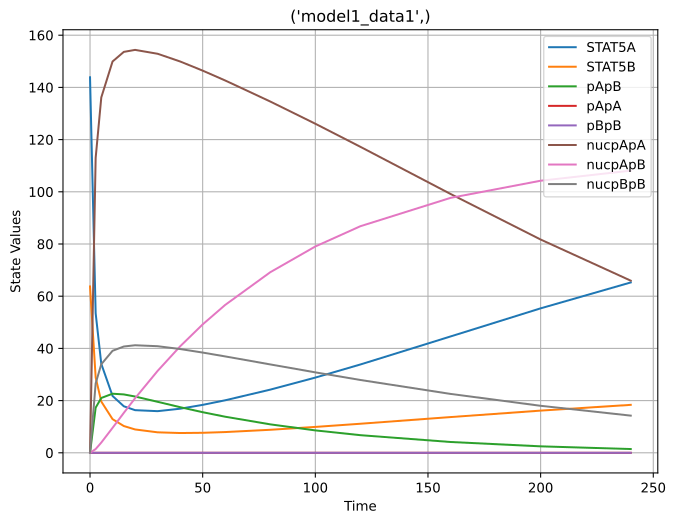
Success! The simulation completed successfully, and we can now plot the resulting state trajectories.
[5]:
%matplotlib inline
import matplotlib.pyplot as plt
import numpy as np

# Define the simulation condition
simulation_condition = ("model1_data1",)


def plot_simulation(results):
    """
    Plot the state trajectories from the simulation results.

    Parameters:
        results (dict): Simulation results from run_simulations.
    """
    # Extract the simulation results for the specific condition
    ic = results["simulation_conditions"].index(simulation_condition)

    # Create a new figure for the state trajectories
    plt.figure(figsize=(8, 6))
    for ix in range(results["x"].shape[2]):
        time_points = np.array(results["ts"][ic, :])
        state_values = np.array(results["x"][ic, :, ix])
        plt.plot(
            time_points, state_values, label=jax_problem.model.state_ids[ix]
        )

    # Add labels, legend, and grid
    plt.xlabel("Time")
    plt.ylabel("State Values")
    plt.title(simulation_condition)
    plt.legend()
    plt.grid(True)
    plt.show()


# Plot the simulation results
plot_simulation(results)
run_simulations enables users to specify the simulation conditions to be executed. For more complex models, this allows for restricting simulations to a subset of conditions. Since the Böhm model includes only a single condition, we demonstrate this functionality by simulating no condition at all.
[6]:
llh, results = run_simulations(jax_problem, simulation_conditions=tuple())
results
[6]:
{'llh': Array([], shape=(0,), dtype=float64),
 'stats_dyn': None,
 'stats_posteq': None,
 'ts': Array([], shape=(0,), dtype=float64),
 'x': Array([], shape=(0,), dtype=float64),
 'stats_preeq': None,
 'dynamic_conditions': [],
 'preequilibration_conditions': [],
 'simulation_conditions': ()}
Updating Parameters
As next step, we will update the parameter values used for simulation. However, if we attempt to directly modify the values in JAXModel.parameters, we encounter a FrozenInstanceError.
[7]:
from dataclasses import FrozenInstanceError

import jax

# Generate random noise to update the parameters
noise = (
    jax.random.normal(
        key=jax.random.PRNGKey(0), shape=jax_problem.parameters.shape
    )
    / 10
)

# Attempt to update the parameters
try:
    jax_problem.parameters += noise
except FrozenInstanceError as e:
    print("Error:", e)
Error: cannot assign to field 'parameters'
The root cause of this error lies in the fact that, to enable autodiff, direct modifications of attributes are not allowed in equinox, which AMICI utilizes under the hood. Consequently, attributes of instances like JAXModel or JAXProblem cannot be updated directly — this is the price we have to pay for autodiff.
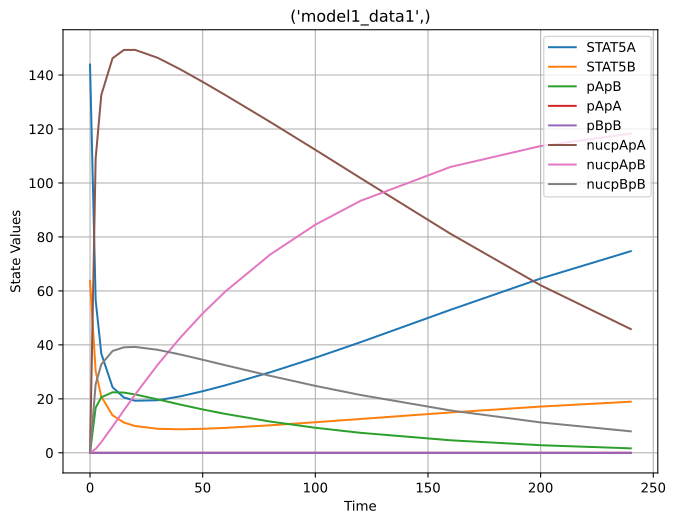
However, JAXProblem provides a convenient method called update_parameters. The caveat is that this method creates a new JAXProblem instance instead of modifying the existing one.
[8]:
# Update the parameters and create a new JAXProblem instance
jax_problem = jax_problem.update_parameters(jax_problem.parameters + noise)

# Run simulations with the updated parameters
llh, results = run_simulations(jax_problem)

# Plot the simulation results
plot_simulation(results)
Computing Gradients
Similar to updating attributes, computing gradients in the JAX ecosystem can feel a bit unconventional if you’re not familiar with the JAX ecosystem. JAX offers automatic differentiation through the jax.grad function. However, to use jax.grad with JAXProblem, we need to specify which parts of the JAXProblem should be treated as static.
[9]:
try:
    # Attempt to compute the gradient of the run_simulations function
    jax.grad(run_simulations, has_aux=True)(jax_problem)
except TypeError as e:
    print("Error:", e)
Error: Argument '/home/docs/checkouts/readthedocs.org/user_builds/amici/checkouts/2974/doc/examples/example_jax_petab/amici_models/0.34.1/Boehm_JProteomeRes2014_jax/__init__.py' of type <class 'pathlib._local.PosixPath'> is not a valid JAX type.
Fortunately, equinox simplifies this process by offering filter_grad, which enables autodiff functionality that is compatible with JAXProblem and, in theory, also with JAXModel.
[10]:
import equinox as eqx

# Compute the gradient using equinox's filter_grad, preserving auxiliary outputs
grad, _ = eqx.filter_grad(run_simulations, has_aux=True)(jax_problem)
Functions transformed by filter_grad return gradients that share the same structure as the first argument (unless specified otherwise). This allows us to access the gradient with respect to the parameters attribute directly via grad.parameters.
[11]:
grad.parameters
[11]:
Array([-3.77211474e+01, -1.00899861e-02, -8.03189309e+00, -5.24934890e+01,
        2.79781838e-05,  4.64940263e+01, -1.42202305e+01,  2.35345733e-01,
        2.96135034e-01], dtype=float64)
Attributes for which derivatives cannot be computed (typically anything that is not a jax.numpy.array) are automatically set to None.
[12]:
grad
[12]:
JAXProblem(
  parameters=f64[9],
  model=JAXModel_Boehm_JProteomeRes2014(
    api_version='0.0.4', jax_py_file=None, nns={}, parameters=f32[8]
  ),
  simulation_conditions=((None,),),
  _parameter_mappings={'model1_data1': None},
  _ts_dyn=f64[1,48],
  _ts_posteq=f64[1,0],
  _my=f64[1,48],
  _iys=None,
  _iy_trafos=None,
  _ts_masks=None,
  _op_numeric=f32[1,48,0],
  _op_mask=None,
  _op_indices=None,
  _np_numeric=f64[1,48,1],
  _np_mask=None,
  _np_indices=None,
  _petab_measurement_indices=f64[1,48],
  _petab_problem=None
)
Observant readers may notice that the gradient above appears to include numeric values for derivatives with respect to some measurements. However, simulation_conditions internally disables gradient computations using jax.lax.stop_gradient, resulting in these values being zeroed out.
[13]:
grad._my[ic, :]
[13]:
Array([0., 0., 0., 0., 0., 0., 0., 0., 0., 0., 0., 0., 0., 0., 0., 0., 0.,
       0., 0., 0., 0., 0., 0., 0., 0., 0., 0., 0., 0., 0., 0., 0., 0., 0.,
       0., 0., 0., 0., 0., 0., 0., 0., 0., 0., 0., 0., 0., 0.],      dtype=float64)
However, we can compute derivatives with respect to data elements using JAXModel.simulate_condition. In the example below, we differentiate the observables y (specified by passing y to the ret argument) with respect to the timepoints at which the model outputs are computed after the solving the differential equation. While this might not be particularly practical, it serves as an nice illustration of the power of automatic differentiation.
[14]:
import diffrax
import jax.numpy as jnp
import optimistix
from amici.jax import ReturnValue

# Define the simulation condition
simulation_condition = ("model1_data1",)
ic = jax_problem.simulation_conditions.index(simulation_condition)

# Load condition-specific data
ts_dyn = jax_problem._ts_dyn[ic, :]
ts_posteq = jax_problem._ts_posteq[ic, :]
my = jax_problem._my[ic, :]
iys = jax_problem._iys[ic, :]
iy_trafos = jax_problem._iy_trafos[ic, :]
ops = jax_problem._op_numeric[ic, :]
nps = jax_problem._np_numeric[ic, :]

# Load parameters for the specified condition
p = jax_problem.load_model_parameters(simulation_condition[0])


# Define a function to compute the gradient with respect to dynamic timepoints
@eqx.filter_jacfwd
def grad_ts_dyn(tt):
    return jax_problem.model.simulate_condition(
        p=p,
        ts_dyn=tt,
        ts_posteq=ts_posteq,
        my=jnp.array(my),
        iys=jnp.array(iys),
        iy_trafos=jnp.array(iy_trafos),
        ops=jnp.array(ops),
        nps=jnp.array(nps),
        solver=diffrax.Kvaerno5(),
        controller=diffrax.PIDController(atol=1e-8, rtol=1e-8),
        root_finder=optimistix.Newton(atol=1e-8, rtol=1e-8),
        steady_state_event=diffrax.steady_state_event(),
        max_steps=2**10,
        adjoint=diffrax.DirectAdjoint(),
        ret=ReturnValue.y,  # Return observables
    )[0]


# Compute the gradient with respect to `ts_dyn`
g = grad_ts_dyn(ts_dyn)
g
[14]:
Array([[ 1.59800220e+02,  0.00000000e+00,  0.00000000e+00, ...,
         0.00000000e+00,  0.00000000e+00,  0.00000000e+00],
       [ 0.00000000e+00,  5.22020537e+01,  0.00000000e+00, ...,
         0.00000000e+00,  0.00000000e+00,  0.00000000e+00],
       [ 0.00000000e+00,  0.00000000e+00,  1.56010772e+01, ...,
         0.00000000e+00,  0.00000000e+00,  0.00000000e+00],
       ...,
       [ 0.00000000e+00,  0.00000000e+00,  0.00000000e+00, ...,
        -2.39688846e-01,  0.00000000e+00, -7.24785830e-09],
       [ 0.00000000e+00,  0.00000000e+00,  0.00000000e+00, ...,
         0.00000000e+00, -1.29133583e-01, -2.73577782e-09],
       [ 0.00000000e+00,  0.00000000e+00,  0.00000000e+00, ...,
         0.00000000e+00,  0.00000000e+00, -1.18495576e-02]],      dtype=float64)
Model training
This setup makes it pretty straightforward to train models using equinox and optax frameworks. Below we provide barebones implementation that runs training for 5 steps using Adam.
[15]:
from optax import adam

# define loss function
loss = eqx.filter_value_and_grad(run_simulations, has_aux=True)

# initialise adam
optim = adam(0.01)
# eqx.partition is necessary here to only initialize the optimizer for array variables
param, static = eqx.partition(jax_problem, eqx.is_array)
opt_state = optim.init(param)


# define update function
@eqx.filter_jit
def make_step(problem, opt_state):
    current_loss, grads = loss(problem)
    updates, opt_state = optim.update(grads, opt_state)
    model = eqx.apply_updates(problem, updates)
    return current_loss, model, opt_state


# run 5 optimisation steps
for step in range(5):
    current_loss, jax_problem, opt_state = make_step(jax_problem, opt_state)
    current_loss = current_loss[0].item()
    print(f"step={step}, loss={current_loss}")
step=0, loss=-141.20609247197598
step=1, loss=-143.46206577898204
step=2, loss=-146.8464868999643
step=3, loss=-151.37778691501683
step=4, loss=-157.08972682870615
Compilation & Profiling
To maximize performance with JAX, code should be just-in-time (JIT) compiled. This can be achieved using the jax.jit or equinox.filter_jit decorators. While JIT compilation introduces some overhead during the first function call, it significantly improves performance for subsequent calls. To demonstrate this, we will first clear the JIT cache and then profile the execution.
[16]:
from time import time

# Clear JAX caches to ensure a fresh start
jax.clear_caches()

# Define a JIT-compiled gradient function with auxiliary outputs
gradfun = eqx.filter_jit(eqx.filter_grad(run_simulations, has_aux=True))
[17]:
# Measure the time taken for the first function call (including compilation)
start = time()
run_simulations(jax_problem)
print(f"Function compilation time: {time() - start:.2f} seconds")

# Measure the time taken for the gradient computation (including compilation)
start = time()
gradfun(jax_problem)
print(f"Gradient compilation time: {time() - start:.2f} seconds")
Function compilation time: 3.46 seconds
Gradient compilation time: 11.80 seconds
[18]:
%%timeit
run_simulations(
    jax_problem,
    controller=diffrax.PIDController(
        rtol=1e-8,  # same as amici default
        atol=1e-16,  # same as amici default
        pcoeff=0.4,  # recommended value for stiff systems
        icoeff=0.3,  # recommended value for stiff systems
        dcoeff=0.0,  # recommended value for stiff systems
    ),
)
22.5 ms ± 697 μs per loop (mean ± std. dev. of 7 runs, 1 loop each)
[19]:
%%timeit
gradfun(
    jax_problem,
    controller=diffrax.PIDController(
        rtol=1e-8,  # same as amici default
        atol=1e-16,  # same as amici default
        pcoeff=0.4,  # recommended value for stiff systems
        icoeff=0.3,  # recommended value for stiff systems
        dcoeff=0.0,  # recommended value for stiff systems
    ),
)
27.6 ms ± 377 μs per loop (mean ± std. dev. of 7 runs, 1 loop each)
[20]:
import amici
from amici.petab import simulate_petab

# Import the PEtab problem as a standard AMICI model
amici_model = import_petab_problem(
    petab_problem,
    verbose=False,
    jax=False,  # load the amici model this time
)

# Configure the solver with appropriate tolerances
solver = amici_model.create_solver()
solver.set_absolute_tolerance(1e-8)
solver.set_relative_tolerance(1e-16)

# Prepare the parameters for the simulation
problem_parameters = dict(
    zip(jax_problem.parameter_ids, jax_problem.parameters)
)
[21]:
# Profile simulation only
solver.set_sensitivity_order(amici.SensitivityOrder.none)
[22]:
%%timeit
simulate_petab(
    petab_problem,
    amici_model,
    solver=solver,
    problem_parameters=problem_parameters,
    scaled_parameters=True,
    scaled_gradients=True,
)
34.7 ms ± 112 μs per loop (mean ± std. dev. of 7 runs, 10 loops each)
[23]:
# Profile gradient computation using forward sensitivity analysis
solver.set_sensitivity_order(amici.SensitivityOrder.first)
solver.set_sensitivity_method(amici.SensitivityMethod.forward)
[24]:
%%timeit
simulate_petab(
    petab_problem,
    amici_model,
    solver=solver,
    problem_parameters=problem_parameters,
    scaled_parameters=True,
    scaled_gradients=True,
)
40.2 ms ± 59.7 μs per loop (mean ± std. dev. of 7 runs, 10 loops each)
[25]:
# Profile gradient computation using adjoint sensitivity analysis
solver.set_sensitivity_order(amici.SensitivityOrder.first)
solver.set_sensitivity_method(amici.SensitivityMethod.adjoint)
[26]:
%%timeit
simulate_petab(
    petab_problem,
    amici_model,
    solver=solver,
    problem_parameters=problem_parameters,
    scaled_parameters=True,
    scaled_gradients=True,
)
51.5 ms ± 401 μs per loop (mean ± std. dev. of 7 runs, 10 loops each)