
PEtab 2.0 import
Note: PEtab v2 support in AMICI is experimental and subject to change.
This notebook demonstrates how to import a PEtab v2 problem for computing the objective function and gradient, or for simulating individual conditions using AMICI. We assume that you are already familiar with the basics of AMICI and PEtab.
[1]:
import logging

import amici
from amici.petab.petab_importer import *
from amici.petab.simulations import RDATAS
from amici.plotting import *
from petab.v2 import Problem
We load a PEtab problem from the PEtab benchmark problem collection. Currently, these are only available in PEtab 1.0 format. However, when loading them with petab.v2.Problem.from_yaml, they will be automatically converted to the PEtab 2.0 format.
[2]:
# Load a PEtab v2 problem
problem_id = "Boehm_JProteomeRes2014"
petab_yaml = f"https://benchmarking-initiative.github.io/Benchmark-Models-PEtab/tree/Benchmark-Models/{problem_id}/{problem_id}.yaml"
problem = Problem.from_yaml(petab_yaml)

print(problem)
PEtab Problem without ID with models [<SbmlModel 'model_Boehm_JProteomeRes2014'>], 0 conditions, 0 experiments, 3 observables, 48 measurements, 9 estimated parameters
First, we create an AMICI model from the PEtab v2 problem via PetabImporter. This will account for the observation model encoded in the PEtab problem, as well as for the different experimental conditions. This is important to keep in mind when using the model anything else than the PEtab-encoded experiments, which should generally be avoided. For the actual simulations, the easiest way is to use a PetabSimulator.
[3]:
importer = PetabImporter(problem, verbose=logging.INFO)
simulator = importer.create_simulator()
2025-11-10 08:35:21.795 - amici.petab.petab_importer - INFO - Validating PEtab problem ...
WARNING: Conditions {'_petab_experiment_condition___default__', '_petab_preequilibration_on', '_petab_preequilibration_off'} are not used in the experiments table. [CheckUnusedConditions]
2025-11-10 08:35:21.999 - amici.petab.petab_importer - INFO - Importing model 'model_Boehm_JProteomeRes2014'...
2025-11-10 08:35:21.999 - amici.petab.petab_importer - INFO - Module name is 'model_Boehm_JProteomeRes2014'.
Writing model code to 'amici_models/0.34.1/model_Boehm_JProteomeRes2014'.
2025-11-10 08:35:22.000 - amici.petab.petab_importer - INFO - #Observables: 3
2025-11-10 08:35:22.015 - amici.petab.petab_importer - INFO - Number of fixed parameters: 2
2025-11-10 08:35:22.070 - amici.sbml_import - INFO - Finished importing SBML                         (5.08E-02s)
2025-11-10 08:35:22.082 - amici.sbml_import - INFO - Finished processing observation model           (7.31E-03s)
2025-11-10 08:35:22.115 - amici.de_model - INFO - Finished computing xdot                            (1.76E-04s)
2025-11-10 08:35:22.119 - amici.de_model - INFO - Finished computing w                               (9.01E-05s)
2025-11-10 08:35:22.123 - amici.de_model - INFO - Finished computing x0                              (8.60E-05s)
2025-11-10 08:35:22.762 - amici.de_export - INFO - Finished generating cpp code                      (6.32E-01s)
2025-11-10 08:35:35.283 - amici.de_export - INFO - Finished compiling cpp code                       (1.25E+01s)
Now let’s run the simulations:
[4]:
# simulate all conditions encoded in the PEtab problem for which there are measurements
#  using the nominal parameter values from the PEtab problem
result = simulator.simulate(problem.get_x_nominal_dict())
assert all(r.status == amici.AMICI_SUCCESS for r in result[RDATAS]), (
    "Simulation failed."
)
result
[4]:
{'edatas': [<Swig Object of type 'amici::ExpData *' at 0x78168ad0b0f0
    condition '__default__' starting at t=0.0 with custom constants, parameters
    16x3 time-resolved datapoints
      (48/48 measurements & 0/48 sigmas set)
    10x0 event-resolved datapoints
      (0/0 measurements & 0/0 sigmas set)
  >],
 'rdatas': [<ReturnDataView(id='__default__', status=AMICI_SUCCESS)>],
 'llh': -138.22199707036594,
 'sllh': None,
 's2llh': None,
 'res': array([ 2.05083539,  0.69734485, -2.08268743, -2.28195143, -1.59765627,
        -0.33846351, -1.04995203, -1.2833982 , -0.70072171,  1.05404708,
         2.37986392,  2.37400063,  0.77199537,  1.46076623,  1.08718089,
        -0.27517334,  0.92190577,  1.1869646 , -0.18319876,  0.31479119,
         0.78509555,  0.79090097, -0.06952565, -1.17493622, -0.00820183,
        -0.05658488, -0.0321946 , -0.32528431,  0.16313476,  0.36742915,
         0.08577734,  0.43290408, -0.15170715,  0.66412978,  0.84756835,
         0.31058414,  0.0369965 ,  0.53511397,  0.28939273, -1.0026042 ,
         0.67978066,  0.43536307, -1.13084175,  0.82388392,  0.54224915,
        -0.44519587,  0.43520234,  0.045741  ]),
 'sres': None}
The returned dictionary contains the simulation results for all experimental conditions encoded in the PEtab problem in result['rdatas']. Those are the same objects as for any other AMICI simulation using amici.run_simulation. Additionally, the dictionary contains the ExpData instances used for the simulations in result['edatas'], which we will use below to visualize the PEtab-encoded measurements. result['llh'] and result['sllh'] contain the aggregated log-likelihood
value and its gradient, respectively, over all experimental conditions. These can be used directly for parameter estimation. However, for parameter estimation, it is recommended to use the pypesto package that provides a full parameter estimation framework on top of AMICI and PEtab.
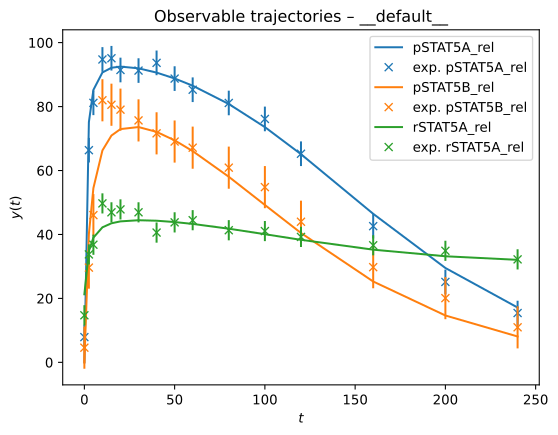
Now, let’s have a look at the results of the first experimental condition:
[5]:
rdata = result["rdatas"][0]
edata = result["edatas"][0]
plot_observable_trajectories(rdata, model=simulator.model, edata=edata)
Simulation settings can be adjusted via the PetabSimulator.solver and PetabSimulator.model attributes, which are instances of amici.Solver and amici.Solver, respectively.
Simulating individual conditions
It’s also possible to simulate only specific experimental conditions encoded in the PEtab problem. The ExperimentManager takes care of creating ExpData the respective instances, and setting the condition-specific parameters, measurements, and initial states:
[6]:
model = importer.create_model()
# It's important to use the petab problem from the importer, as it was modified to encode the experimental conditions.
em = ExperimentManager(model=model, petab_problem=importer.petab_problem)
These are the experiments encoded in the PEtab problem:
[7]:
importer.petab_problem.experiments
[7]:
[Experiment(id='__default__', periods=[])]
We can now create an ExpData instance for any experiment, by passing the petab.v2.Experiment or its ID to em.create_edata, and simulate it as usual with AMICI:
[8]:
edata = em.create_edata(importer.petab_problem.experiments[-1])
edata
[8]:
<Swig Object of type 'amici::ExpData *' at 0x78168805f7b0
  condition '__default__' starting at t=0.0 with custom constants, parameters
  16x3 time-resolved datapoints
    (48/48 measurements & 0/48 sigmas set)
  10x0 event-resolved datapoints
    (0/0 measurements & 0/0 sigmas set)
>
[9]:
rdata = model.simulate(edata=edata)
assert rdata.status == amici.AMICI_SUCCESS, "Simulation failed."
rdata
[9]:
<ReturnDataView(id='__default__', status=AMICI_SUCCESS)>
[10]:
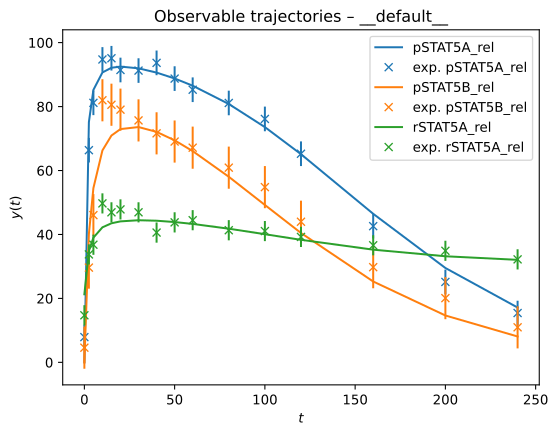
plot_observable_trajectories(rdata, model=model, edata=edata)
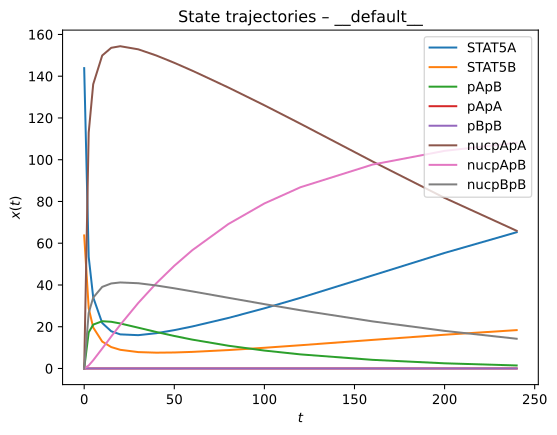
plot_state_trajectories(rdata, model=model)
[11]:
rdata.xr.x.to_pandas()
[11]:
| state | STAT5A | STAT5B | pApB | pApA | pBpB | nucpApA | nucpApB | nucpBpB |
|---|---|---|---|---|---|---|---|---|
| time | ||||||||
| 0.0 | 143.866800 | 63.733200 | 0.000000 | 0.000000e+00 | 0.000000e+00 | 0.000000 | 0.000000 | 0.000000 |
| 2.5 | 53.461482 | 28.866293 | 17.303845 | 5.386664e-05 | 1.570433e-05 | 112.989532 | 1.447405 | 26.596568 |
| 5.0 | 34.064516 | 19.639670 | 21.010107 | 2.044304e-05 | 6.795310e-06 | 136.155799 | 3.930605 | 33.942223 |
| 10.0 | 21.774004 | 12.893681 | 22.640030 | 7.298358e-06 | 2.559189e-06 | 149.922972 | 9.562615 | 39.084556 |
| 15.0 | 17.828955 | 10.260349 | 22.370326 | 4.275710e-06 | 1.416057e-06 | 153.605367 | 15.310408 | 40.726497 |
| 20.0 | 16.339729 | 8.951948 | 21.568754 | 3.138009e-06 | 9.418891e-07 | 154.369341 | 20.909397 | 41.209184 |
| 30.0 | 15.959862 | 7.849783 | 19.540055 | 2.285805e-06 | 5.529632e-07 | 152.878985 | 31.383430 | 40.842402 |
| 40.0 | 16.896038 | 7.579549 | 17.476677 | 1.955992e-06 | 3.936263e-07 | 149.923889 | 40.800477 | 39.763943 |
| 50.0 | 18.366757 | 7.669554 | 15.559399 | 1.764732e-06 | 3.077188e-07 | 146.418863 | 49.199821 | 38.406694 |
| 60.0 | 20.128822 | 7.951048 | 13.827277 | 1.618329e-06 | 2.525102e-07 | 142.637834 | 56.668725 | 36.928776 |
| 80.0 | 24.206964 | 8.823438 | 10.901549 | 1.364406e-06 | 1.812753e-07 | 134.584159 | 69.190791 | 33.861824 |
| 100.0 | 28.823688 | 9.921002 | 8.588154 | 1.127704e-06 | 1.336001e-07 | 126.069390 | 79.054417 | 30.821304 |
| 120.0 | 33.842769 | 11.136501 | 6.756330 | 9.062760e-07 | 9.813552e-08 | 117.230826 | 86.815637 | 27.899422 |
| 160.0 | 44.576763 | 13.692910 | 4.139361 | 5.343324e-07 | 5.041804e-08 | 99.175005 | 97.674310 | 22.564289 |
| 200.0 | 55.351270 | 16.168490 | 2.479972 | 2.799725e-07 | 2.388906e-08 | 81.710133 | 104.245912 | 18.008858 |
| 240.0 | 65.275479 | 18.379688 | 1.445318 | 1.323202e-07 | 1.049064e-08 | 65.946977 | 108.115833 | 14.243720 |
The parameter values used for the simulation are the nominal values from the PEtab problem by default. You can, of course, also provide custom parameter values. The parameter values can be updated using em.apply_parameters({'parameter1': 0.1, ... }).
That’s it! You have successfully imported and simulated a PEtab v2 problem using AMICI.
Changing simulation settings, e.g., tolerances, sensitivity methods, etc., works as usual with AMICI models. Check out the other AMICI notebooks for more information.